

Understanding Variables and Data Types in JavaScript
Variables & Data-Types In JS

Introduction
When I started having general conversations about JavaScript to my friends , I notices that most confusion did not come from complex topics like frameworks or asynchronous programming. It came from something far more basic variables and data types. Only may be one or two of my friends truly understood these foundations, everything else started to feel manageable.
In this article, I want to walk you through variables and data types in JavaScript in a clear and practical way . I will keep it simple, use real-life examples.
So Lets get Started...
Variables: A simple Real-life Analogy
Suppose you want to eat maggie and you already know that the maggie stored in one of the boxes in the kitchen. So you will go into the kitchen , pickup that box where maggie stored inside it , open the box and extract maggie from that, then further process you will do...
In JavaScript, a variable works exactly like that box. It stores information so that your program can use it later.
For example:
let name = "Rahul";
Here, name is the box in general, but In technical terms It's a particular memory location name inside RAM, and "Rahul" is the data stored inside it.
Why do we need variables?
Because programs deal with changing information. A user’s name, age, login status, or score in a game — all of these need to be stored somewhere. Variables give us that storage.
How to Declare Variables in JavaScript
We can declare variables using three keywords:
var
let
const
So let's understand each one with simple examples
1. Using var
This was the original way to declare variables in JavaScript. You can change its value later.
var city = "Mumbai";
city = "Delhi"; //The value changes without any issue.
2. Using let
In modern JavaScript, let is preferred over var in most cases because it behaves more predictably, especially when dealing with scope (which we will discuss shortly).
let age = 25;
age = 26; //Like var, the value of a let variable can also be changed
3. Using const
Think of const as a sealed box. Once you put something inside, you cannot replace it. With const, the value cannot be changed after it is assigned.
const country = "India";
country = "USA"; // This will cause an error
Primitive Data Types in JavaScript
When we store something inside a variable, that “something” has a type. In JavaScript, there are several primitive data types.
So Let's explore each data type one by one...
1. String
A String represents sequence of characters within single or double quotes.
let name = "ChaiCode";
2. Number
A number represents numeric values. JavaScript does not separate integers and decimals. Both are simply numbers.
let age = 30;
let price = 99.99;
3. Boolean
A boolean represents either true or false. This is commonly used for conditions, like checking if a user is logged in or not.
let isStudent = true;
4. Null
null means an empty value that you intentionally assign.
let middleName = null;
You are clearly saying: “This variable currently has no value.”
5. Undefined
If you declare a variable but do not assign any value, it becomes undefined.
let phoneNumber;
Here, phoneNumber exists, but nothing has been stored in it yet.
Here is the catch: Mostly beginners often confuse null and undefined, so A simple way to remember:
undefinedmeans “no value assigned yet.”nullmeans “I intentionally set it to empty.”
How Values Can Change
To verify that , values or data are changing or not, you can debug them by display the variable by using console.log() on the terminal or browser console.
For example,
let score = 10;
console.log(score); // 10

score = 20;
console.log(score); // 20

//The value changes because we used let.
Now try the same with const:
const maxScore = 100;
maxScore = 200; // Error
The Basic Difference Between var, let, and const
| Feature | var | let | const |
|---|---|---|---|
| Can reassign value | Yes | Yes | No |
| Block scope | No | Yes | Yes |
| Used in modern code | Rarely | Yes | Yes |
Important Note: When you are working on real-life projects, then you have to remember these three points:
Use
constwhen the value should not change.Use
letwhen the value may change.Avoid
varin modern JavaScript unless you have a specific reason.
Understanding Scope
Scope simply means: “Where can I access this variable?”
Think of scope like rooms in a house. If you keep a book in your bedroom, it is not automatically available in the kitchen.
Let’s see a simple example:
{
  let message = "Hello";
}
console.log(message); // Error
The variable message was declared inside curly braces { }. It only exists inside that block. Outside of it, JavaScript does not recognize it.
Now compare with var:
{
  var greeting = "Hi";
}
console.log(greeting); // Works
Here, greeting is still accessible outside the block. This difference can cause unexpected behaviour, which is why let and const are safer.
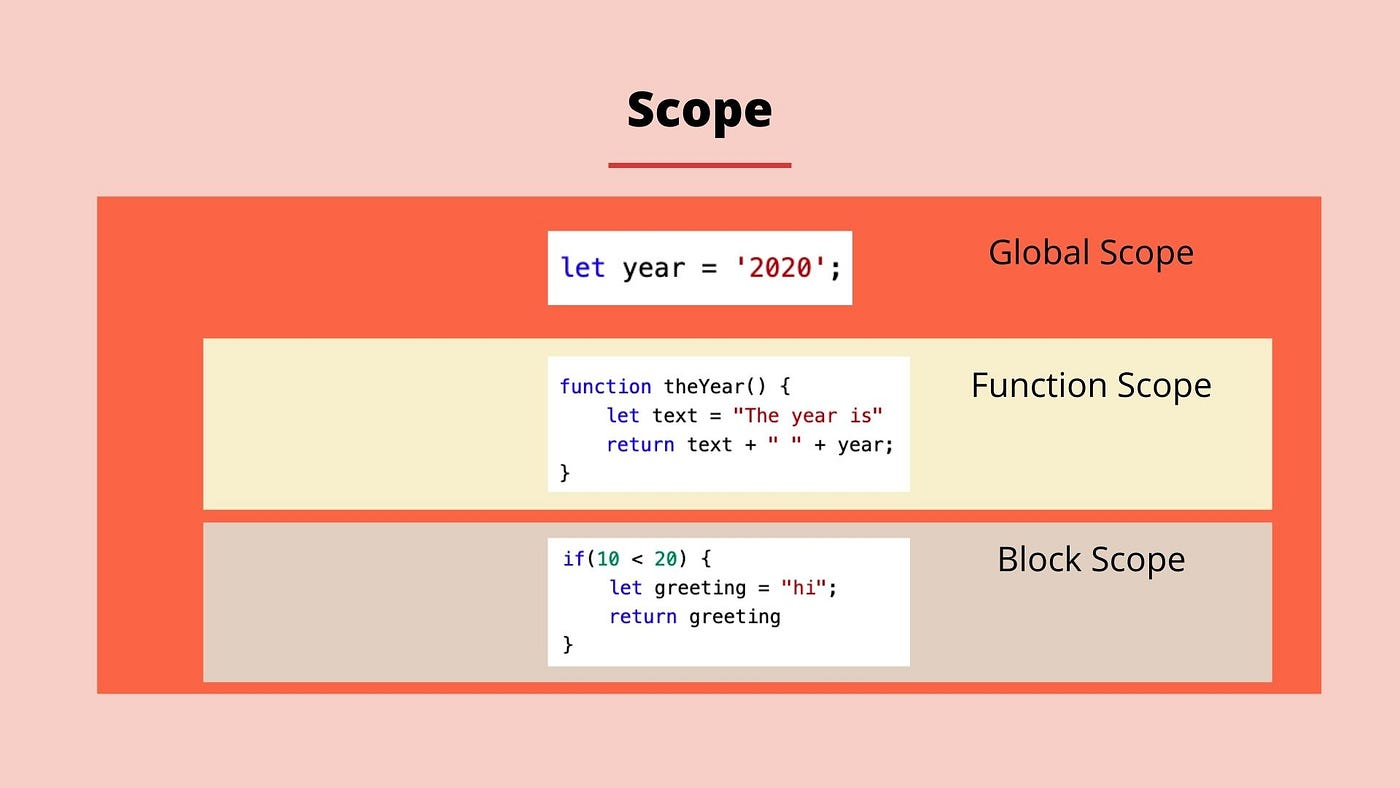
Scope Visualization
Imaginethree rectangles:
A large outer rectangle representing the global scope.
Two smaller rectangles inside representing function & block scope.
Variables declared with let inside the smaller rectangles stay there. If variables declared with var can leak into the outer rectangle.
Understanding this early will save you from many debugging headaches later.
Conclusion
The article discusses the fundamental concepts of variables and data types in JavaScript, emphasizing their importance as the building blocks of programming. It uses a simple analogy of a box storing items to explain how variables work in JavaScript, where variables act as containers for storing data that can be used later in a program. The article outlines the necessity of variables for handling changing information, such as a user's details or game scores, and introduces the three keywords used to declare variables in JavaScript: var, let, and const. Each has different characteristics, with var being the original method that allows reassignment, let offering more predictable behavior with block scope, and const preventing reassignment after initial assignment.
The article also delves into the primitive data types in JavaScript, including strings, numbers, booleans, null, and undefined, explaining their uses and differences. It highlights common beginner confusions between null and undefined and provides a simple distinction between the two. The discussion on scope clarifies where variables can be accessed within a program, using the analogy of rooms in a house. The article illustrates the differences in scope behavior between var, let, and const, with let and const being safer choices for modern JavaScript due to their block scope. The article concludes by advising best practices: using const for unchanging values, let for values that may change, and avoiding var unless necessary. Understanding these concepts is crucial for writing effective and error-free JavaScript code.


