

The Node.js Event Loop Explained: What Actually Keeps Your Server Running
The Story of NodeJS Event Loop

Introduction
If you strip Node.js down to its core, you’re left with a simple constraint: it runs JavaScript on a single thread. That sounds like a limitation—and it is. But it’s also the reason Node.js behaves the way it does.
The event loop exists to make that limitation practical.
If you don’t understand the event loop, you don’t understand Node.js. Everything—callbacks, promises, async/await—depends on it.
The Starting Point: Single-Threaded Execution
JavaScript in Node.js runs on a single thread. That means:
One piece of code executes at a time
No parallel execution in the main thread
Long tasks block everything else
If Node.js simply executed tasks one after another, it would perform poorly under real-world load.
So the question becomes:
How does Node.js handle multiple operations without multiple threads?
The answer is the event loop.
What the Event Loop Actually Is
The event loop is not a feature you call. It’s a mechanism that continuously checks:
“Is the main execution stack empty? If yes, what task should run next?”
It acts like a coordinator between:
The call stack (where code executes)
The task queue (where completed async tasks wait)
You can think of it as a manager that ensures work keeps flowing without blocking.
Let's have a look on the below diagram, which explains you how event loop works under the hood in simple manner.
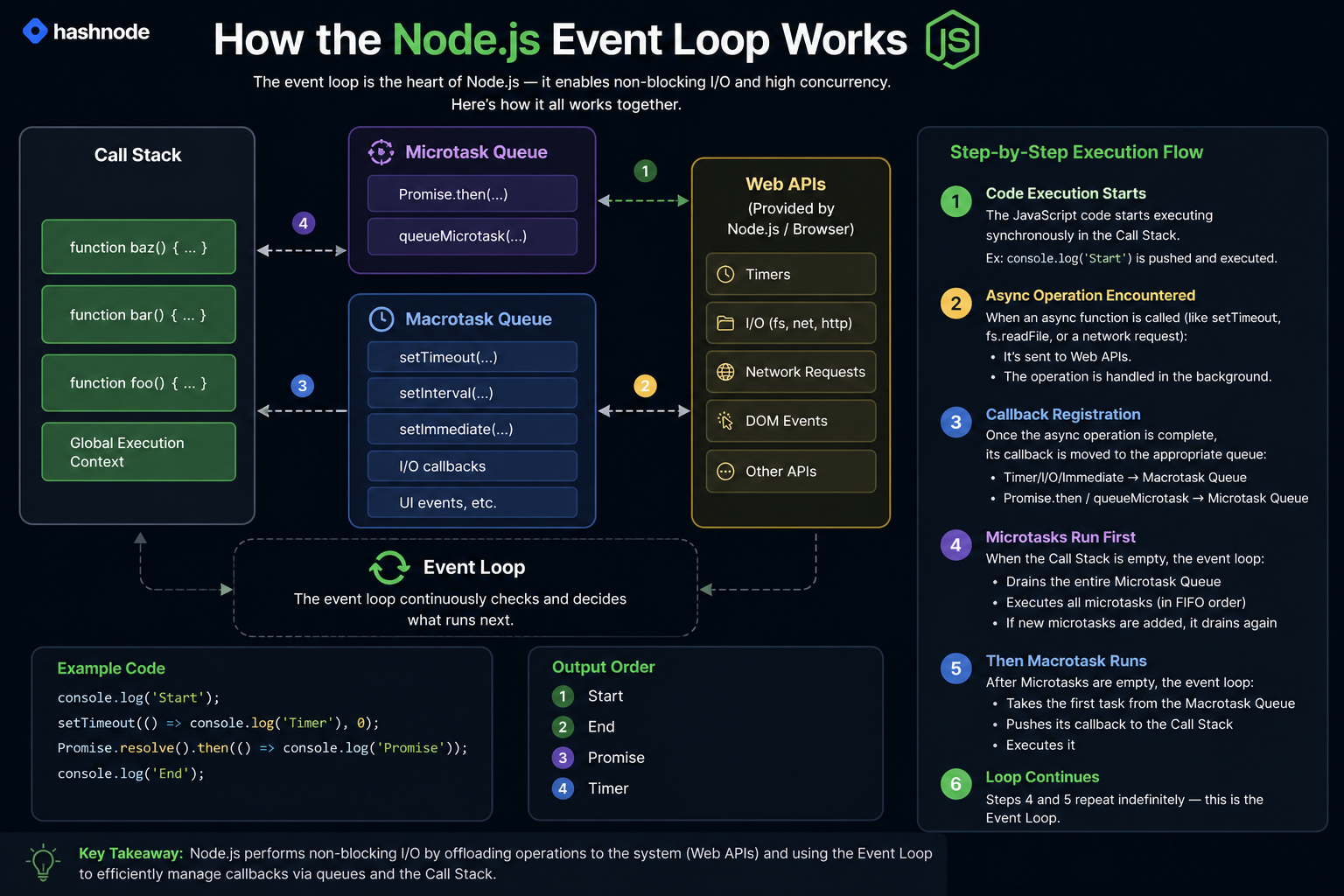
Why Node.js Needs the Event Loop
Without the event loop, Node.js would behave like this:
Receive a request
Wait for it to complete
Move to the next request
That’s inefficient.
With the event loop:
Start a task (like reading a file)
Offload it
Continue handling other tasks
Come back when the result is ready
This is how Node.js achieves concurrency without multiple threads in user code.
Call Stack vs Task Queue (Conceptual View)
To understand execution, you need to separate two things:
Call Stack
This is where code runs. It follows a strict order—last in, first out.
Task Queue
This is where completed asynchronous tasks wait to be executed. It contains two types of task queues: microtask queue (which is responsible for higher priority tasks, like promises, async-await operations) and macrotask queue (which is responsible for lower priority tasks like, settimeout).
Simply put: Microtasks get executed right away (high priority), while Macrotasks wait for their turn in the next loop (low priority).
The event loop connects these two.

Execution flow:
Code enters the call stack
Async operations are offloaded
When complete, callbacks go to the queue
Event loop pushes them to the stack when it’s free
How Async Operations Are Handled
Let’s look at a simple example:
console.log("Start");

setTimeout(() => {
  console.log("Timer done");
}, 0);

console.log("End");
Output:
Start
End
Timer done
What actually happens:
"Start"runs immediatelysetTimeoutis registered and sent to the system"End"runs immediatelyTimer completes and its callback enters the queue
Event loop pushes callback to stack
"Timer done"runs
The delay is not the key factor—the scheduling is.
Timers vs I/O Callbacks (High-Level View)
Not all asynchronous tasks behave the same way.
Timers (setTimeout, setInterval)
Scheduled to run after a delay, but only when the stack is free.
I/O Operations (file reads, network calls)
Handled by the system and queued when completed.
Insight
Even if a timer finishes early, it still waits for the stack to clear. Execution order is controlled by the event loop, not just timing.
The Role of the Event Loop in Scalability
This is where things become practical.
Traditional systems often use one thread per request. That consumes memory and CPU quickly.
Node.js does this differently:
One thread handles many requests
Async tasks are offloaded
Event loop manages execution
Result:
Lower resource usage
Higher concurrency
Better handling of I/O-heavy workloads
This is why Node.js is effective for:
APIs
Real-time systems
Streaming applications
A Common Misunderstanding
Many developers think:
“Node.js runs everything in parallel.”
That’s incorrect.
Node.js:
Executes JavaScript on a single thread
Uses the system to handle async tasks
Uses the event loop to schedule execution
If you don’t understand this, you’ll misinterpret performance behavior.
A Practical Mental Model
Think of the event loop as a scheduler with one rule:
“Never interrupt running code. Only run new tasks when the stack is empty.”
Everything else follows from this.
Conclusion
The event loop is the mechanism that allows Node.js to handle multiple operations efficiently despite being single-threaded.
It works by:
Executing synchronous code immediately
Delegating asynchronous work
Scheduling callbacks when ready
If you understand this flow, async behavior becomes predictable.
If you don’t, you’ll constantly be surprised by execution order and performance issues.


