

Understanding HTML Tags and Elements
HTML: The Backbone of Every Web Page

Introduction
When someone opens a website, what they see on the screen feels simple—text, images, buttons, and sections laid out neatly. Behind this simplicity lies a structured language that tells the browser what to display and how the content is organized. That language is HTML. Before learning styling or interactivity, understanding HTML tags and elements is the first and most important step in web development.
This article explains HTML from the ground up, focusing on clarity rather than complexity, so beginners can build a strong foundation.
What HTML Is and Why We Use It
HTML stands for Hyper Text Markup Language. It is not a programming language but a markup language used to structure content on the web. Every webpage you visit is built on HTML, whether it is a small blog or a large application.
A simple way to think about HTML is to see it as the skeleton of a webpage. Just like a human body needs bones to give it shape, a webpage needs HTML to define headings, paragraphs, images, and sections. Without HTML, a browser would not know which text is a heading, which part is a paragraph, or where an image belongs.
We use HTML because it gives meaning to content. Search engines, browsers, and assistive technologies all rely on HTML structure to understand and present information correctly.
What an HTML Tag Is
An HTML tag is a keyword wrapped in <angle brackets> that tells the browser how to treat the content. Tags act like labels. They describe what a piece of content represents rather than how it looks.
For example, when the browser sees a paragraph tag <p>content</p> , it understands that the text inside it should be treated as a paragraph. When it sees a heading tag, it knows the text is more important and should be displayed as a heading.
Tags are not visible on the webpage. They work behind the scenes to guide the browser.
Opening Tag, Closing Tag, and Content
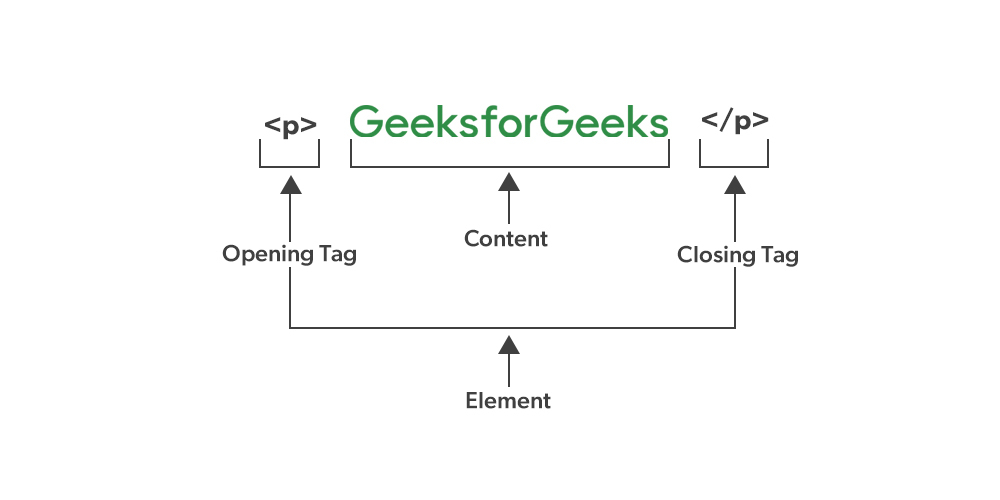
Most HTML tags come in pairs. The opening tag marks the beginning of an element, and the closing tag marks its end. The actual text or data placed between them is called the content.
For example, in a heading, the opening tag tells the browser where the heading starts, the closing tag tells it where the heading ends, and the text in between is what the user reads on the screen.

This structure helps the browser clearly understand where one piece of content finishes and the next one begins.
What an HTML Element Means
An HTML element is the complete unit formed by the opening tag, the content, and the closing tag together. While people often use the words “tag” and “element” interchangeably, they are not the same.
A tag is only the marker, whereas an element is the entire structure. Understanding this difference is important because browsers, developers, and documentation usually talk in terms of elements.
This below visual helps beginners instantly see the difference between a tag and an element.
Self-Closing (Void) Elements
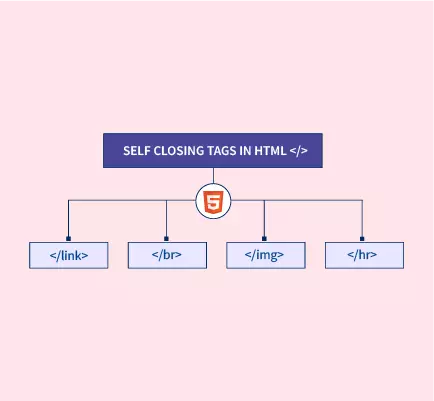
Not all HTML elements have content. Some elements are designed to perform a specific task without wrapping any text. These are called self-closing or void elements.
For example, an image element does not contain text inside it. It simply tells the browser to display an image at a particular place. Similarly, line breaks and input fields work the same way.
These elements do not need a closing tag because there is no content to close.
Block-Level vs Inline Elements
HTML elements are broadly divided into block-level and inline elements, based on how they behave on a webpage.
Block-level elements always start on a new line and take up the full width available. They are commonly used to structure large sections of a page, such as paragraphs, divisions, and headings. When a block element appears, the browser automatically pushes the next content to a new line.
Inline elements, on the other hand, do not start on a new line. They stay within the flow of the surrounding text and only take up as much space as their content needs. Inline elements are often used to style or mark small portions of text inside a paragraph.

Commonly Used HTML Tags
When starting out, it is best to focus on a small set of commonly used HTML tags rather than trying to learn everything at once. Paragraph tags are used for regular text content, heading tags define titles and subheadings, division tags help group sections together, and span tags are used for small inline text portions.
These basic tags are enough to build simple yet meaningful webpages. Once these are understood, learning advanced tags becomes much easier and more natural.
| Tag Structure | Tag Name | Example |
<h1>...</h1> | Heading | <h1>Main Title</h1> |
<p>...</p> | Paragraph | <p>This is a paragraph.</p> |
<div>...</div> | Division | <div>Content here</div> |
<span>...</span> | Span | <span>Inline text</span> |
<a>...</a> | Anchor (Link) | <a href="https://example.com">Visit</a> |
<img /> | Image | <img src="image.jpg" alt="Sample image"> |
<ul>...</ul> | Unordered List | <ul><li>Item</li></ul> |
<ol>...</ol> | Ordered List | <ol><li>Item</li></ol> |
<li>...</li> | List Item | <li>List item</li> |
<button>...</button> | Button | <button>Click Me</button> |
<input /> | Input Field | <input type="text"> |
<br /> | Line Break | Line one<br>Line two |
<strong>...</strong> | Strong Text | <strong>Important</strong> |
<em>...</em> | Emphasized Text | <em>Italic text</em> |
Conclusion
This article provides a beginner-friendly introduction to HTML, the foundational markup language for structuring content on the web. It explains key concepts such as HTML tags, elements, self-closing tags, and the distinction between block-level and inline elements. The guide also highlights commonly used HTML tags and their purposes, helping newcomers build a strong understanding before exploring more advanced web development topics.


