

Understanding Object-Oriented Programming in JavaScript
Object Oriented Programming in JS: Classes, Objects, Constructors, and Encapsulation Explained
Introduction
Modern software development often deals with complex systems. As applications grow, managing code in a structured and maintainable way becomes essential. This is where Object-Oriented Programming, commonly known as OOP, becomes extremely useful.
JavaScript, despite being a flexible and dynamic language, supports object-oriented programming principles that help developers organize code more effectively. By using classes and objects, developers can model real-world entities in code and create reusable, scalable systems.
In this article, we will understand how object-oriented programming works in JavaScript using simple concepts, relatable analogies, and small practical examples
What Object-Oriented Programming Means
Object-Oriented Programming is a programming style where software is organized around objects rather than just functions or logic.
An object represents a real-world entity and contains two things:
Data (properties)
Behaviour (methods)
For example, imagine a human. A human has properties like name, age, and gender. At the same time, it can perform actions such as studying, playing games, etc.
In programming, we represent this idea by grouping data and behaviour together into objects. This approach makes the code easier to read, easier to maintain, and closer to how we naturally think about real-world things.
Instead of writing scattered variables and functions, OOP allows us to create structured components that represent real entities.
Understanding OOP with a Real-World Analogy
Before jumping into code, it helps to think about a simple real-world example.
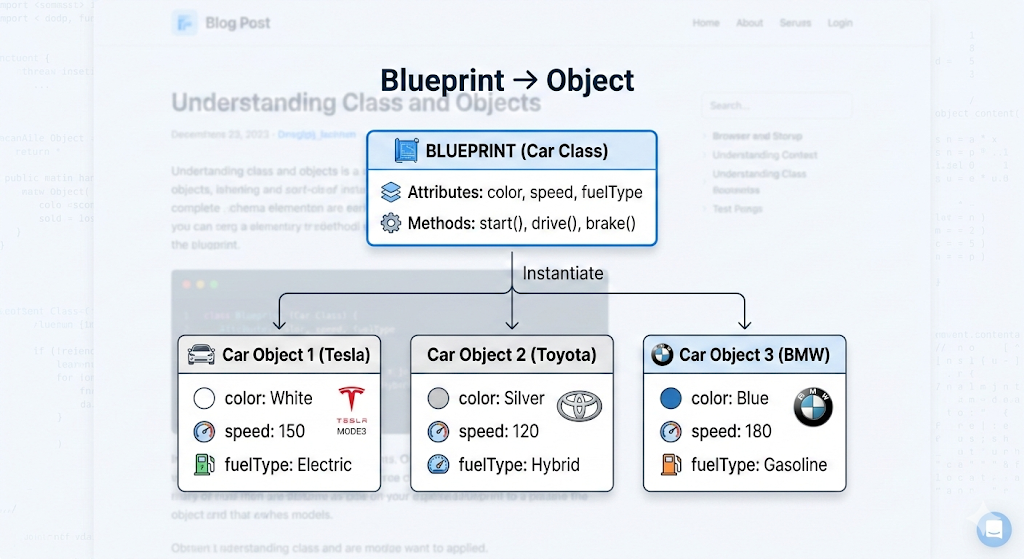
Consider the concept of a car blueprint. When a car manufacturer designs a car, they first create a blueprint. This blueprint defines what every car will look like and what features it will have.
The blueprint itself is not a car. It is simply a design or template.
However, when the manufacturer produces cars using that blueprint, each produced car becomes an individual object.
For example:
Blueprint → Defines the structure of a car
Actual Cars → BMW, Tesla, Toyota models built from that blueprint
In programming terms:
The blueprint is a class
The cars created from it are objects
What Is a Class in JavaScript
A class in JavaScript acts as a blueprint for creating objects.
It defines what properties an object should have and what actions it can perform.
JavaScript introduced the class syntax in ES6 to make object-oriented programming easier and more structured.
Here is a simple example:
class Person {
  constructor(name, age) {
    this.name = name;
    this.age = age;
  }
}
In this example, the class Person defines two properties: name and age.
The class itself does not represent a specific person. It only describes what information every person object will contain.
Creating Objects Using Classes
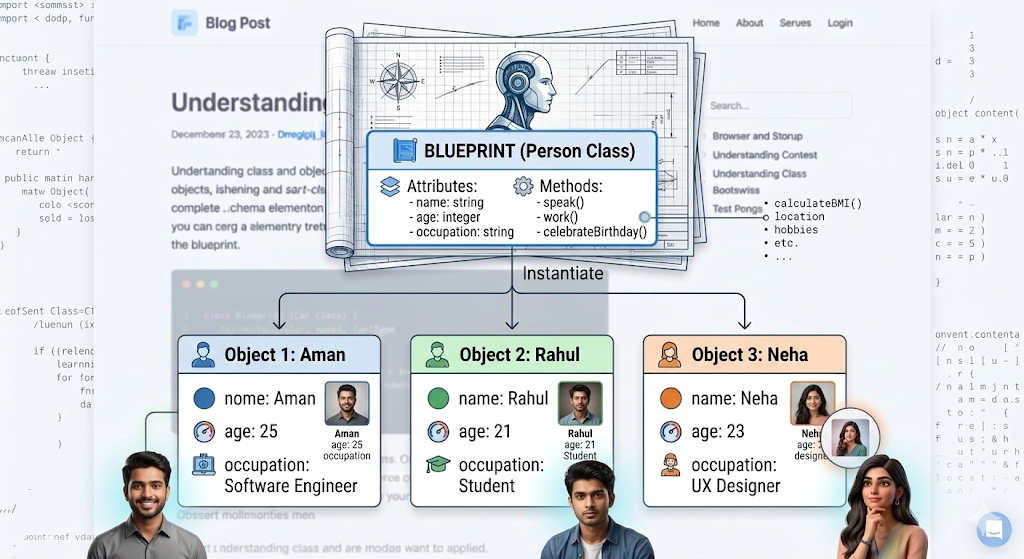
Once a class is defined, we can create objects from it. This process is called instantiation.
Each object created from the class represents a specific instance.
const person1 = new Person("Aman", 25);
const person2 = new Person("Rahul", 21);
Now we have two separate objects created from the same blueprint.
Although both objects follow the same structure, they store different values.
This ability to create multiple objects from a single template is one of the key advantages of object-oriented programming.
The Constructor Method
Inside a class, the constructor method plays a very important role.
A constructor is a special method that runs automatically whenever a new object is created from a class.
Its main purpose is to initialize the object with values.
In JavaScript, the constructor method looks like this:
class Student {
  constructor(name, age) {
    this.name = name;
    this.age = age;
  }
}
When we create a new object:
const student1 = new Student("Rahul", 21);
The constructor runs automatically and assigns values to the properties.
Here, the keyword this refers to the current object being created.
So this.name means the name property of that specific student object.
Methods Inside a Class
In addition to storing data, classes can also contain methods.
Methods are functions that define the behavior of objects.
Let’s extend the Student class with a method.
class Student {
  constructor(name, age) {
    this.name = name;
    this.age = age;
  }

  printDetails() {
    console.log(this.name + " is " + this.age + " years old.");
  }
}
Now we can use this method on any object created from the class.
const student1 = new Student("Rahul", 21);
student1.printDetails();
Output:
Rahul is 21 years old.
Methods allow objects to perform actions while using their own data.
This is a powerful way to keep related data and behaviour together.
Basic Idea of Encapsulation
One of the important principles of object-oriented programming is encapsulation.
Encapsulation simply means bundling data and the methods that operate on that data inside a single unit.
In JavaScript, a class naturally provides this structure.
For example, the Student class keeps:
student data (name, age)
student behavior (printDetails method)
inside one logical container.
Instead of spreading this information across different parts of the program, everything related to the student stays organized within the class.
This approach makes the code easier to understand and maintain as projects grow larger.
A Small Practical Example
Let’s combine everything we have learned and create a simple Student class.
class Student {
  constructor(name, age) {
    this.name = name;
    this.age = age;
  }

  printDetails() {
    console.log("Name:", this.name);
    console.log("Age:", this.age);
  }
}

const student1 = new Student("Aman", 22);
const student2 = new Student("Rahul", 21);

student1.printDetails();
student2.printDetails();
Here, we created two student objects from the same class, and each object can print its own details.
This demonstrates the full flow of object-oriented programming in JavaScript.
Practice Assignment: Build a Simple Library System
Create a class called Book that represents a book in a small library.
The class should store basic information such as the title, author, and year of publication. Inside the class, create a method that prints the complete details of the book in a readable format.
After defining the class, create multiple book objects such as different novels or technical books and call the method to display their information.
As an additional step, try adding another method that checks whether the book is recent (published after 2015) and prints a message accordingly.
This small exercise will help you practice creating classes, using constructors, defining methods, and working with multiple objects.
Conclusion
Object-Oriented Programming helps developers structure code in a way that mirrors how we understand the real world. By using classes as blueprints and objects as their instances, JavaScript allows us to build organized and reusable components. Once these fundamentals become clear, writing scalable and maintainable applications becomes much easier. Mastering these ideas is a strong step toward writing cleaner, more professional JavaScript code.


