

Arrow Functions in JavaScript: A Simpler Way to Write Functions
Understanding the Arrow Functions in JavaScript

Introduction
JavaScript has evolved significantly over the years. As the language matured, developers looked for ways to write cleaner, shorter, and more readable code. One such improvement came with arrow functions, introduced in ES6 (ECMAScript 2015).
Arrow functions provide a more concise way to write functions while keeping the syntax simple and modern. If you have been writing JavaScript for a while, you may remember how frequently traditional functions required repetitive boilerplate code. Arrow functions reduce that overhead and make code easier to read.
In this article, we will explore what arrow functions are, how their syntax works, and how they differ from traditional JavaScript functions. By the end, you will have a solid understanding of when and how to use them effectively.
What Are Arrow Functions?
An arrow function is a shorter syntax for writing functions in JavaScript. Instead of using the function keyword, arrow functions use an arrow (=>) between the parameters and the function body.
They are commonly used for small functions, callbacks, and functional programming patterns where readability and brevity matter.
Let’s start with a simple example.
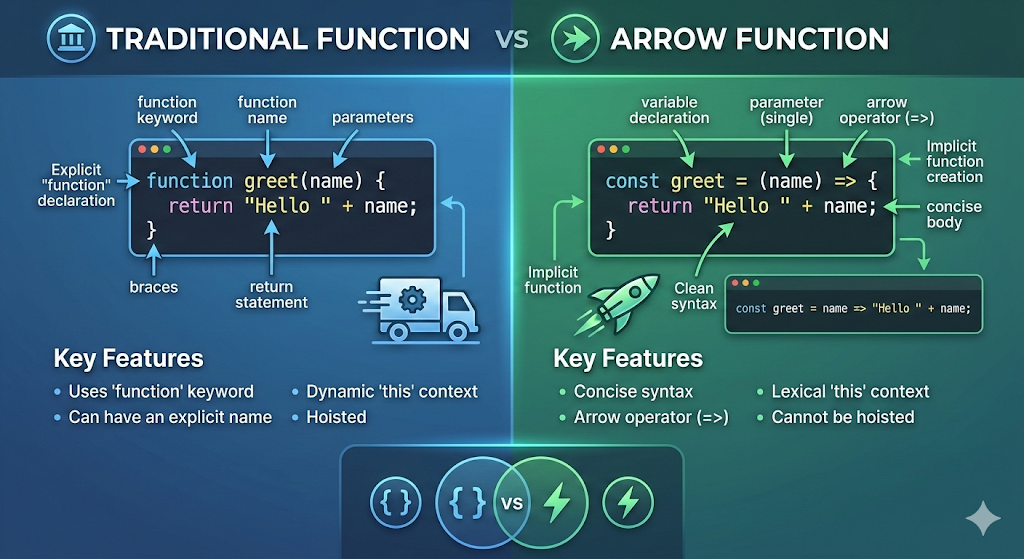
Traditional Function
function greet(name) {
  return "Hello " + name;
}
Arrow Function
const greet = (name) => {
  return "Hello " + name;
};
Both functions do exactly the same thing, but the arrow function version removes the function keyword and uses a more compact structure.
Basic Arrow Function Syntax
Understanding the syntax is key to using arrow functions correctly.
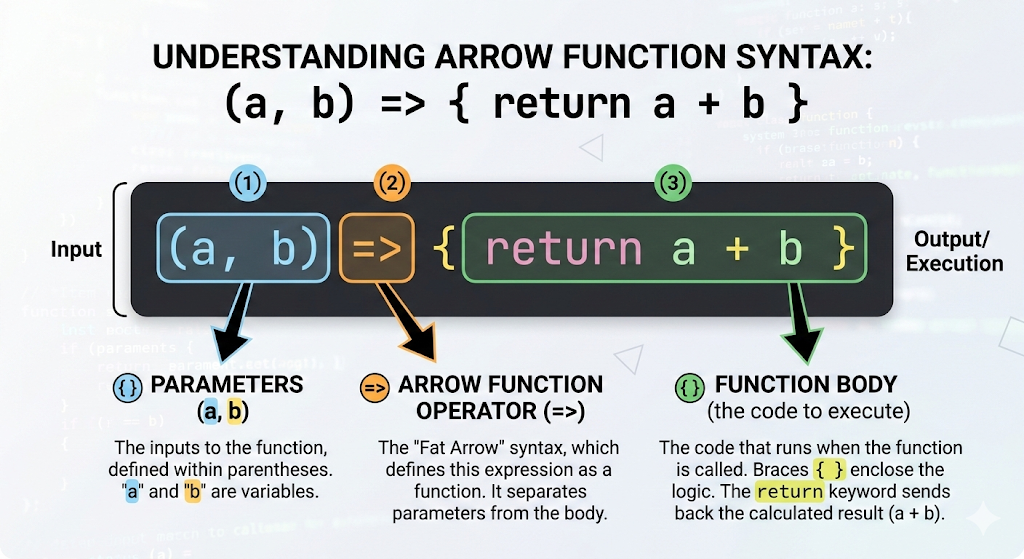
The general structure looks like this:
const functionName = (parameters) => {
   // function body
};
Breaking it down:
const functionName→ stores the function in a variable(parameters)→ input values passed to the function=>→ arrow operator separating parameters and body{}→ function logic
Here is a basic example:
const add = (a, b) => {
  return a + b;
};

console.log(add(3, 5)); // 8
This function receives two numbers and returns their sum.
Arrow Functions with One Parameter
When an arrow function has only one parameter, the parentheses around the parameter are optional. This makes the syntax even shorter.
Standard Syntax
const square = (num) => {
  return num * num;
};
Shorter Syntax
const square = num => {
  return num * num;
};
Both versions behave the same way.
Example usage:
console.log(square(4)); // 16
This syntax is commonly used in callbacks or array methods where small functions are needed.
Arrow Functions with Multiple Parameters
When a function has two or more parameters, parentheses become mandatory.
Example:
const multiply = (a, b) => {
  return a * b;
};

console.log(multiply(3, 4)); // 12
Another simple example:
const greetUser = (firstName, lastName) => {
  return "Hello " + firstName + " " + lastName;
};

console.log(greetUser("John", "Doe"));
Using parentheses helps maintain clarity when multiple inputs are involved.
Implicit Return vs Explicit Return
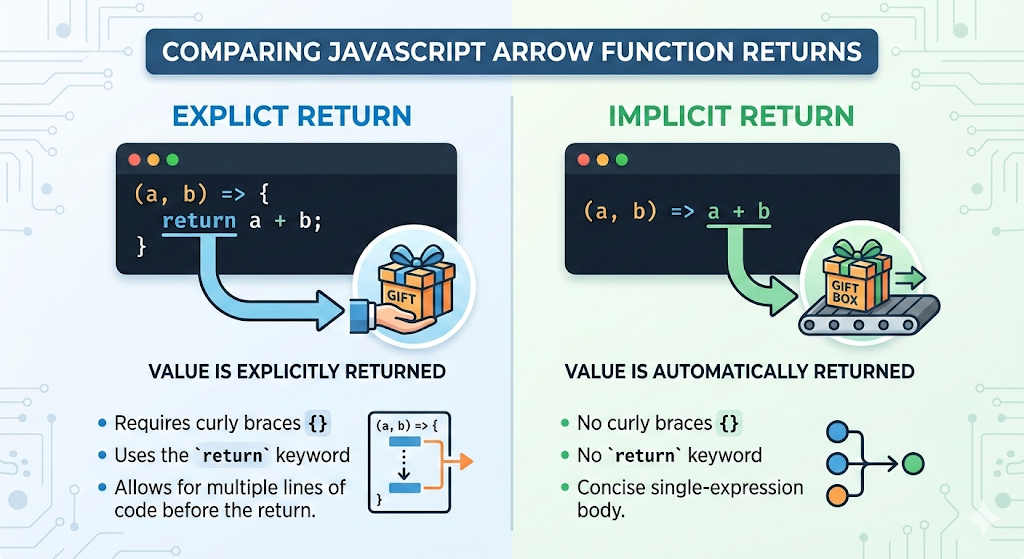
Arrow functions introduce a useful feature called implicit return, which allows you to return values without writing the return keyword.
Explicit Return
This is the standard way, using curly braces and the return keyword.
const add = (a, b) => {
  return a + b;
};
Implicit Return
If the function body contains only one expression, JavaScript automatically returns it.
const add = (a, b) => a + b;
Example:
console.log(add(2, 3)); // 5
Notice that:
No curly braces are used
No
returnkeyword is needed
This is one of the main reasons arrow functions are popular. They allow developers to write concise code without sacrificing readability.
Basic Differences Between Arrow Functions and Normal Functions
Although arrow functions look simpler, they are not just shorter versions of traditional functions. There are some conceptual differences.
However, for beginners it is useful to focus on the most visible distinctions.
Syntax
Traditional functions require the function keyword.
function sum(a, b) {
  return a + b;
}
Arrow functions remove that keyword.
const sum = (a, b) => a + b;
Code Length
Arrow functions typically require fewer lines of code.
Readability
In many modern JavaScript applications, arrow functions improve readability when writing small functions.
Practical Example: Using Arrow Functions with Arrays
Arrow functions are frequently used with array methods such as map(), filter(), and reduce().
Consider an example where we want to double each number in an array.
Using a Traditional Function
const numbers = [1, 2, 3, 4];

const doubled = numbers.map(function(num) {
  return num * 2;
});

console.log(doubled);
Using an Arrow Function
const numbers = [1, 2, 3, 4];

const doubled = numbers.map(num => num * 2);

console.log(doubled);
The arrow function version is shorter and easier to read.
Practice Exercises
To reinforce your understanding, try implementing the following examples yourself.
1. Write a normal function to calculate the square of a number
2. Rewrite it using an arrow function
3. Create an arrow function to check whether a number is even or odd
4. Use an arrow function inside map()
Practicing these small examples will help you become comfortable with the arrow function syntax.
Conclusion
Throughout this article, we explored what arrow functions are, how their syntax works, how to handle parameters, and the difference between implicit and explicit returns. We also looked at how arrow functions simplify common tasks such as working with arrays.


